Here’s Why the Surface Book 3 Is the Powerful Choice for Gamers and Creators

Plus, read on to see how you can save as a Student Edge member.
This post is presented in partnership with Microsoft Store. Student Edge members get 10% off select Surface, PCs and accessories at the Microsoft Store.
Drop everything! (Wait, not that bowl of soup!) It’s time we check out Microsoft’s super-charged Surface Book 3, the latest entry in its specced-out line of powerhouse PCs.
If you’re gearing up to buy a brand new piece of tech to help you with your studies, you may be wondering why you should choose the Surface Book 3 over other laptops and devices.
Well, it all depends what you’re after in your personal computer. Read on to see just what the Surface Book 3 holds and try not to let out a Mariah Carey-esque glass-shattering scream of excitement. (Wait, not next to that priceless vase!)
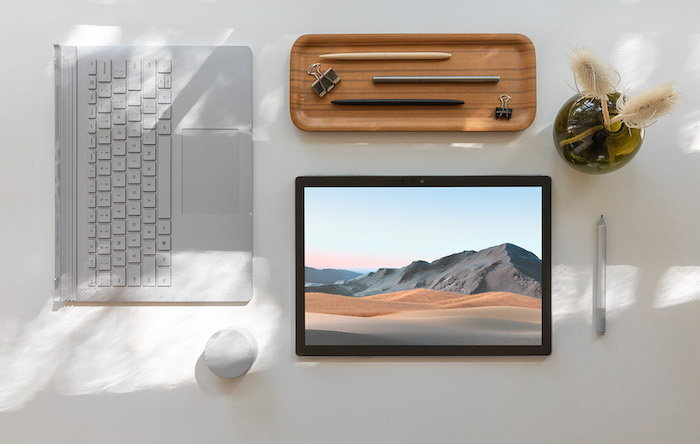
It’s the fastest, most powerful Surface laptop yet.
The Surface Book 3 is specifically for those who are looking for a bit of extra oomph compared to other Surface devices. Microsoft promises this is their fastest Surface yet, and it's built to tackle intensive tasks, video file editing and gaming with the least lag of any Surface. In fact, it’s a whole 50 per cent faster than the Surface Book 2, with quad-core powered 10th Gen Intel Core processors. (What’s that mean? Intel says its 10th Gen processes are best-in-class for wireless connectivity, they are incredibly responsive and intelligent—adapting to how you personally use your device—and they offer desktop caliber performance in lightweight machines, meaning gamers and creators finally have a portable processor.)
It's powerful but portable, with a removable keyboard like your fave Surfaces.
Wired says the Surface Book 3 has one of the best keyboards they’ve used and a top-of-the-line trackpad. That’s great news for the gamers (who can also pair their Xbox Wireless Controller). But its tablet-mode, with high-resolution touch screen, is ideal for those who want to use it for drawing or other more tactile tasks. You really can have the best of both worlds.
It’s designed for those who treat their creativity as more than a hobby.
Students who fancy themselves creators and designers can take advantage of the processing power to get the most out of Adobe Creative Cloud and CAD software, while up-and-coming developers can compile, run and debug anywhere via Microsoft Visual Studio and Unity. However, if you’re looking to enhance your career as a professional influencer, the Surface Book 3 is also suited to shooting videos and recording podcasts on the go for your followers, without sacrificing quality. Connect with a Surface Dock to see your stuff in stunning 4K.
If you want to save up to literal hundreds on your next Surface device, here’s what you've got to do:
- Make sure you’re a Student Edge member. (Remember, it’s free for students to join here.)
- Login and visit our "10% off select Surface, PCs and Accessories at the Microsoft Store" deal page.
- Follow the special link and start shopping! You’ll see the discounts automatically applied to select devices (including the Surface Book 3). However, you'll need to click the 'check your eligibility' button under the products to make sure you can redeem the deal.
- Make the purchase and then lean back satisfied in your chair as the delivery makes its way to your place.
What are you waiting for? Student Edge members get 10% off select Surface, PCs and accessories at the Microsoft Store. Affiliate disclosure: Student Edge may earn a commission if you click these links and buy a product from our partner's page.
Header Image: Microsoft
Topics
Ref: 4309954a-2819-4cbc-a062-ac38006731f7



Comments & Feedback
Share your opinion
Emoji cheatsheet Formatting Comment guidelines