Note-Taking Genius and YouTuber Samuel Suresh Shares His Tips For Our iPad Challenge

“Try and create something that couldn’t be created on pen and paper.”
Note-taking – we’ve all done it, and we all have our own ways of doing it.
We always associate note-taking with studying, exams and stressing about school, but note-taking doesn’t have to be that way.

Samuel Suresh is a note-taking genius on YouTube, who’s taken the form to a whole ‘nother level.
In his videos, Samuel shows his 300k+ subscribers how he can make notes beautiful, and shares tips on how we can make our own notes pop.
For the second year in a row, Samuel has paired up with Student Edge to be one of the official ambassadors of the Student Edge iPad Challenge!
Check out Samuel's first tip on how to create great notes right here:
This year, you’ve got the opportunity to test your mettle by submitting your best notes and illustrations made using iPad and Apple Pencil.
There’s a huge suite of prizes on offer including a grand prize of $1000!
We chatted to Samuel on how he became a note-taking king and his best tips for winning the comp.
How did your note taking journey begin?
I’ve always taken notes throughout my school life. Initially I was really into handwriting notes and drawing them on paper, but as I got into my final years of school in order to be efficient, I ended up reverting to typing up my notes.
It was much easier and I really got frustrated with the process of making mistakes when handwriting notes as I couldn’t change anything.
Once I got into my first semester of university though, I got an iPad and Apple Pencil after seeing someone else use them - it completely transformed the way I took notes. Simple things like the ability to press “undo”, zoom in or just being able to move things around using the lasso tool took away the constraints of pen and paper and allowed my imagination to run free.
And I guess the rest is history.
Why do you do note-taking, and what do you get out of it?
For me note-taking is an extension of my thought process. I used to think note-taking was about transcribing information so that I could regurgitate it later in a test.
But after engaging in university and discovering that true learning is found in understanding and applying knowledge, I realised learning is a process of two parts.
Firstly, breaking things down through being curious and asking questions, and secondly by building them back up in some way, like creating notes.
Through that, I can take the knowledge that I’ve gained and make it my own.
What’s it like being a note-taking influencer?
I’ve been incredibly privileged to have gained a following of 300k on YouTube and its honestly surreal. But honestly, I’ve never seen myself as an “influencer”.
I’m a student just like you, who’s figuring things out, struggling with learning and going through the same journey as other students.
Occasionally I’ll learn something (or try out a tool like iPad) that transforms the way I go about doing things - and so I feel a responsibility to share what I’ve learned so other people can see the wonderful things that I can see. And if that can help someone, that’s enough for me.
What are your note taking essentials?
Aside from my iPad and Apple Pencil, I use GoodNotes to create all my handwritten notes on iPad.
I use the fountain pen and I love the grid paper template as it helps me space out notes when handwriting.
Occasionally I will use my own black paper template and use white ink on the fountain pen to simulate the look of “chalk on a blackboard”.
I often work on my desk with a laptop (where I do all my research and googling), and my iPad is the tool I use to handwrite my notes.
What’s your favourite note taking style?
Note taking for me is a process of two parts — breaking things down and building things up — and I use different note-taking styles for both.
To break down concepts, I use note-taking styles such as mind maps, brainstorms, tree diagrams, listing questions - all of which allow me to get a big picture for the topic area.
After I do my research and begin to understand the topic, I really love creating visual notes with diagrams that tell a story of that concept in a succinct way - that’s probably my favourite style.
What tips do you have for entrants this year?
First, try and create something that could not be created on pen and paper.
iPad and Apple Pencil allow you do to things that couldn’t be done normally, so utilise features like zooming in and playing with space along with the lasso tool to create something cool.
Secondly, even if it is a study note, try and make something beautiful, that evokes some emotional response from the people around you.
If your note looks like something people “want to look at” there’s probably something about it that will evoke a response from the judging panel.
You can head to the iPad Challenge competition page here to find out how to enter and what you can win. Good luck!
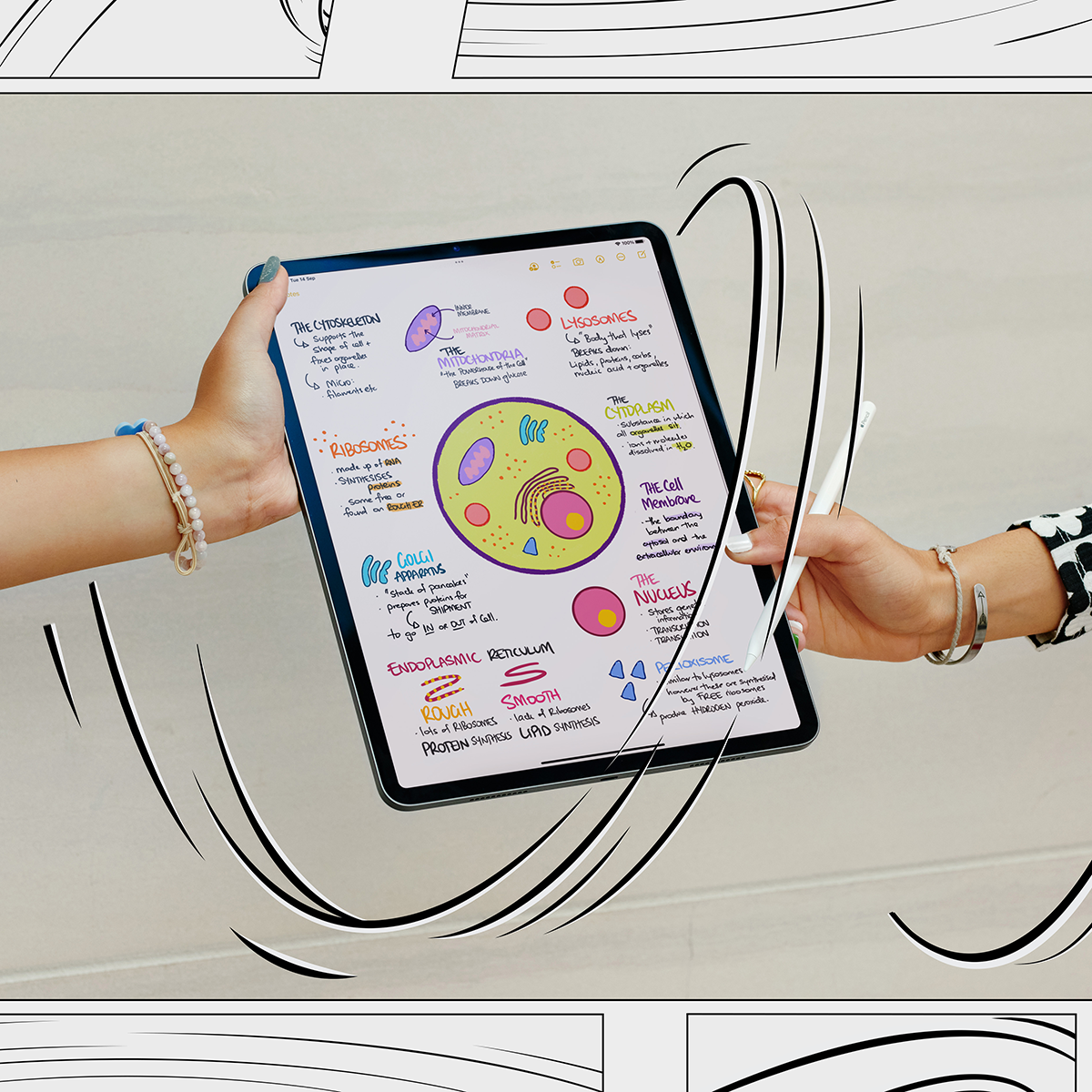
Wanna learn more on note-taking from Samuel? You can learn how to take your class notes further on iPad in free sessions with Today at Apple.
As part of Apple's Study Smarter with Apple series, join student and content creator Samuel Suresh live on 1 and 23 February as he shares his advanced note-taking approach.
You’ll get hands-on with his inspiring techniques and create your own visual notebook using the GoodNotes app. And from 17 January to 13 March, join Apple online to rethink how you capture your learnings in any class.
You’ll pick up new skills using the Notes app to make beautiful documents and boost your productivity.
Topics
Ref: 5291dcf2-0fe5-44bc-a61f-af6b00178651





Comments & Feedback
Share your opinion
Emoji cheatsheet Formatting Comment guidelines