How the Galaxy Tab S11 Ultra Helps You Balance Study, Work, and Self-Care
Who says a student can’t have it all?
This article is presented in partnership with Samsung Galaxy.
Balancing studying, work, spending time with friends, finding time for pursuing hobbies and finding time to wind down and relax can seem like an impossible task as a student. With deadlines looming and what feels like an endless amount of work to complete, it can feel impossible to fit everything you want to do in one day.
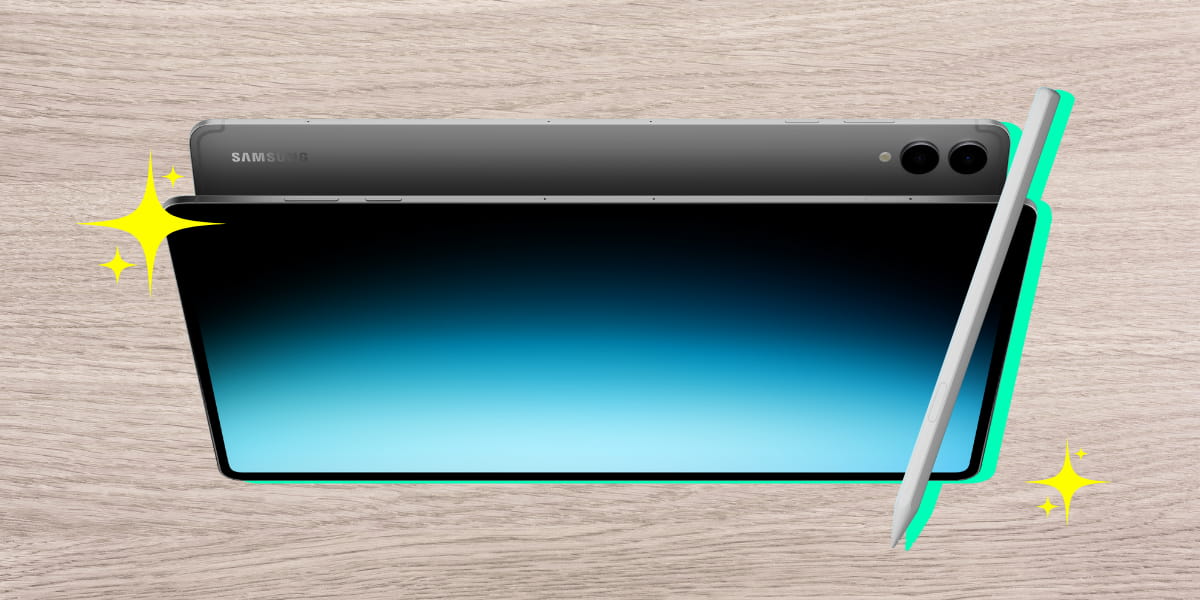
With the new Samsung Galaxy Tab S11 Ultra, you can balance it all in one portable, sleek device. Did we mention it also has a long-lasting battery life* to keep up with every part of your busy schedule?
Study smarter, not harder.

Let’s say you’re writing notes to study for an exam - you’ve got Quizlet going in another window to test your knowledge, plus another window with the syllabus open and another window with the textbook you’re taking notes from. Switching between them can get annoying super quick and interrupt your flow.
For added productivity, the upgraded Samsung DeX13 introduces Extended Mode, transforming the tablet into a full workstation with support for dual external monitors and up to four customised workspaces for different needs, offering greater multitasking and flexibility.
With Galaxy AI**, you’ll get access to a bunch of tools like Note Assist₁ for summarising and organising notes, Chat Assist₂ for improving writing and translation, Web Assist₃ for summarising web articles, and the interactive Gemini Live₄ feature, which can act as a tutor to answer questions and explain complex topics.
Work made easy.

Okay, so you’ve got that exam studying out of the way, but you also have a big assignment coming up and you’ve also got a shift at work later. You don’t know how you’re going to find time to work on the assignment and make it to work on time.
The solution? AI-powered scheduling on the Galaxy Tab S11 Ultra with a superlong battery life to keep up with student life. Use your Galaxy Tab as your personal assistant and get automatic reminders for events, or use Galaxy AI₅ to make a schedule for you.
Stay connected with Quickshare₆ and easily share notes across compatible devices so nothing gets lost.
Wind down with a bit of self-care.

Self-care is so important when we need a bit of downtime away from everything. Some great ways to unwind can be as simple as using a meditation app or just binging your fav show on Netflix.
Watch the latest series or catch your favourite classics in a stunning 14.6” AMOLED 2X display.
Incredibly sharp visuals, vibrant colours and peak brightness in virtually any environment to keep you entertained and engaged. Best of all, you can take it on the go so you can study or kick back with ease.
With the included all-new and exclusive next gen S Pen, you can use it for all kinds of creative projects.
Use the Quick Create feature for easy note-taking with a range of Bluetooth features to take screenshots, enable S Pen to Text, Circle to Search₇, Drawing Assist₈ and more.
Plus the Galaxy Tab S11 Ultra opens the door to Galaxy’s creative ecosystem, offering bundled access to apps like Goodnotes₉, Clip Studio Paint₁₀, LumaFusion₁₁ and Notion₁₂.
It’s the perfect fit for students looking for a versatile device that balances productivity and play.
Designed to be taken anywhere.

No matter where you like to study – at the library, on campus or at home in bed – the Galaxy Tab S11 Ultra is designed for for productivity or entertainment. The Galaxy Tab S11 Ultra is the thinnest Galaxy Tab ever and combines next-generation performance, on a large vibrant 14.6” screen, in a sleek light weight design.
Slip it right into your tote bag or backpack and take it with you, minimising the strain on your shoulder.
Make the switch to a device that’s designed to keep your student life in check. With the handy portable design and countless AI features, it can make finding time to ace your studies and catch up with friends that much easier.
Also available: Samsung Galaxy Tab S11
And if you’re a current student, you can score 20% off in-store or online!* You can claim your discount in-store or online.
Going in store? Simply copy the code above, head into your nearest Samsung store and show your student ID.
Shopping online? Head to the Samsung Education Store,sign up with your student email and start shopping.
*When compared to Galaxy Tab S10 Ultra
**Fees may apply to certain AI featuers at the end of 2025.
1. Requires Samsung Account, Wi-Fi or mobile data. Summary feature for Note Assist is activated when a certain number of characters are met. Result may not be accurate.
2. Some features require Samsung Account. Translation might not be accurate. Accuracy of results is not guaranteed. Functionality is limited to supported apps only.
3. Requires Samsung Account and internet connection. Only compatible with Samsung Internet app. Translation might not be accurate.
4. Gemini is a trademark of Google LLC. Gemini Live feature requires internet connection and Google Account login. Compatible with certain features and certain accounts. Available on select devices and select countries, languages, and to users 18+.
5. Fees may apply to certain AI features at the end of 2025.
6. Shareable file types, number of files shared at a time, and private sharing restrictions may apply depending on recipient device type and method of sharing. For sharing with QR codes and contacts, a 10GB per day restriction applies, and requires a Samsung account and internet connection for both sending and receiving devices.
7. Requires internet connection. May not work on all visual or audio elements.
8. Requires Samsung Account and a network connection. Visible watermark overlay applied. Accuracy of results is not guaranteed.
9. Goodnotes app requires a separate download from Galaxy Store and comes with a 1-year free full version. Once the free full version period ends, an additional purchase is required for continuous use. App availability and the terms of service may vary by country and region.
10. Clip Studio Paint membership required. Clip Studio Paint app comes pre-installed in select markets. The app can be downloaded from Galaxy Store and comes with a 6-month free trial for first-time users. Once the free trial period ends, paid subscription to a monthly or annual usage plan is required for continuous use. A 20% discount is available on the first subscription.
11. LumaFusion app is preloaded as stub, requiring users to click the icon and complete the purchase from Galaxy Store. All Galaxy device users can get a 50% discount when purchasing from Galaxy Store and receive a 30 day free Creator Pass subscription. 50% discount promotion limited until Nov 30, 2026.
12. Notion app requires a separate download from Galaxy Store and comes with a 1-month free trial of the Notion Plus with AI for one newly created Notion workspace. App availability and the terms of service may vary by country and region.
13. Samsung DeX requires app download and internet connection. Requires compatible monitor, PC or Mac for app download. Samsung DeX wireless connection is supported with TVs that support Android tablet screen mirroring (Miracast) only. There may be a difference in performance depending on TV’s specifications and WiFi environment. Recommended to use Samsung Smart TVs launched after ’19. When switching between displays, some apps may restart to adjust to the new screen and certain data in the app may not be saved automatically. Behaviour may vary depending on the app and how it handles screen or mode changes.
Topics


Most Popular



Comments & Feedback
Share your opinion
Emoji cheatsheet Formatting Comment guidelines
The tab s11 seems to be quite powerful and useful especially for university work. But how about tasks like programming ? Should it have the capacity to run ?
We love using it for reading our study notes and taking our own notes. But if you had more questions around how it works, we'd recommend heading to your closest Samsung store as they'd have the answers to your questions! https://www.samsung.com/au/findastore/