How to Check Your Screen Time (and Cut Down on It)

Say no to blue light.
Let’s be real: we all spend a bit too much time looking at screens.
Whether that’s a smartphone screen, TV screen or computer screen, it’s probably not great for our health or mental wellbeing.
If you’ve checked your screen time before and it’s given you a fright, this one’s for you.
And hey, some of us need to use our phones a lot for class, work or important scheduling, so it’s unrealistic to ask you to get rid of your email app or quit using your alarm, right?
So, we’ve broken down a list of simple and easy things you can implement to cut down on your social media and video screen time (including how to check it in the first place), so that you can focus on clearing your mind as much as possible.
How to check your screen time.
If you’ve never checked your screen time before, this will be the first thing you might be wondering how to do.
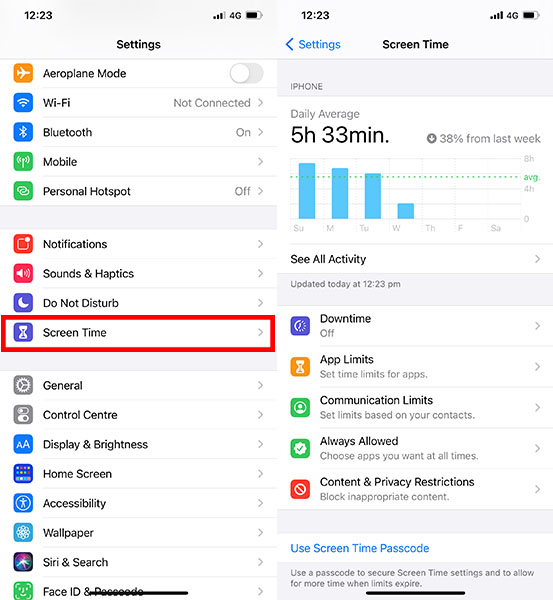
To check your screen time on an iPhone, you’ll want to open up 'Settings' on your iPhone and scroll down to the ‘Screen Time’ tab.
Then all you’ve gotta do is click it and let it load your results. It should give you a daily average but you can check all your detailed results by clicking the ‘See All Activity’ tab.
If you're checking your screen time on an Android, you'll want to open up 'Settings' and tap 'Device Care'. From there, you'll tap 'Battery' and that'll produce a list of the apps you've been using, the total active hours or minutes, overall battery usage percentages and the time the app has been running in the background for the week.
Avoid your phone first thing in the morning.
The first way you can cut down on your screen time is to avoid your phone at the start of your day.
Sure, switch off your alarm when you’re ready to wake up, but don’t let yourself scroll social media for an hour. Instead, put your phone back down and go about your morning routine.
This includes when you’re eating your breakfast. You should try to be conscious about your food and how quickly or slowly you are eating (and how much you're checking your phone while doing so!).
Once you've got some free time on your commute (obviously not if you’re driving), or when you get a break between classes, then you can check your phone and catch up on what’s happening in the world.

Set a wind down time in the evening.
On the opposite side of the coin, you’ll want to make yourself put your phone away from a certain time in the evening too.
According to Harvard Medical School, blue light—the light that our phones give off—supresses the secretion of melatonin (the sleep hormone) more powerfully than any other light, therefore making it harder for us to go to sleep.
As we know, not getting enough sleep can lead to a bunch of other health issues that are no fun.
So, to avoid feeling the effects of blue light, you’ll want to set yourself a wind down time.
There are a few ways you can do this. Firstly, you can do this manually, by putting your phone on charge and leaving it in a place that you won’t touch for the rest of the evening.
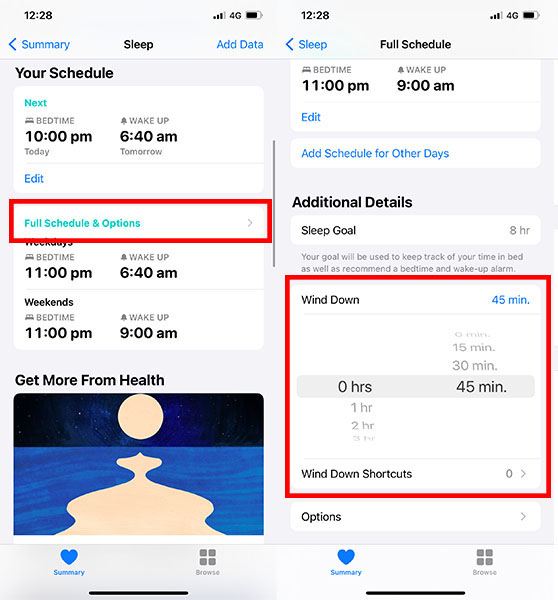
Secondly, you can set a wind down time on your phone's clock and health app. So, by setting a sleep schedule and alarm, you can also set a time that you will get a notification to remind you to wind down, before your schedule says you’re meant to go to sleep.
Here's how you do that on an iPhone:
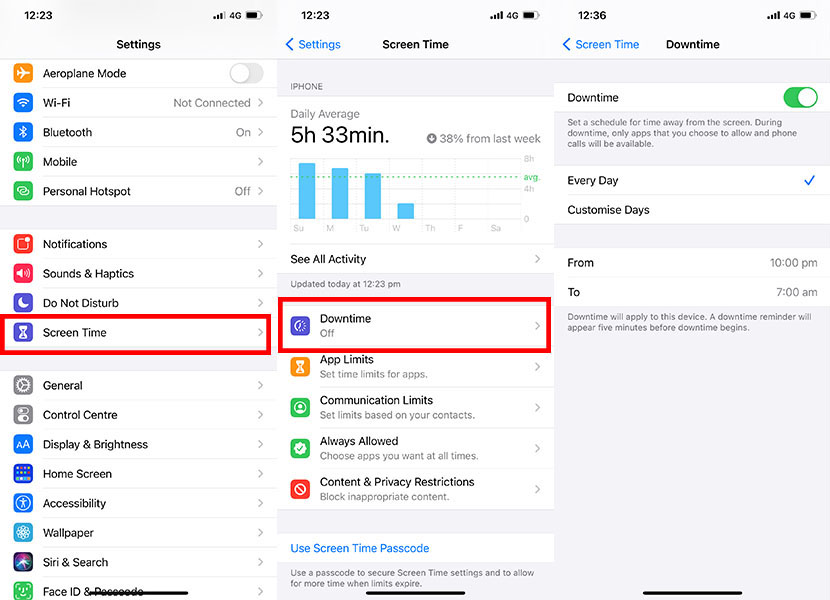
Finally, you can go back into the ‘Screen Time’ tab of your ‘Settings’ function again and select ‘Downtime’. Here you can choose to allow or disallow certain apps from being available from a certain time.
This way you can still use your phone, but only for things you absolutely need.
Be conscious about your media consumption.
The most proactive thing you can do to reduce your screen time is become more aware of what media your consuming, how much of it, and when you’re consuming it.
A great way to be more conscious is to quit watching something while you’re eating, having a conversation, studying, going to the bathroom or going to bed.
You can swap out screen time for music if you need some kind of sound. Plus, being more focused on what you’re doing will allow you to do everything more accurately and appreciate the little things.

Turn off notifications.
This next tip is something I’m sure most of us can get on board with, and that’s getting rid of as many notifications as you can.
The pesky thing about notifications is that they pop up all the time, especially when you’re least expecting them. You can't help but glance at your phone and click on whatever has popped up outta nowhere.
By removing notifications from the equation, you remove the temptation altogether, freeing up a bunch of time that you didn’t even realise you were losing.
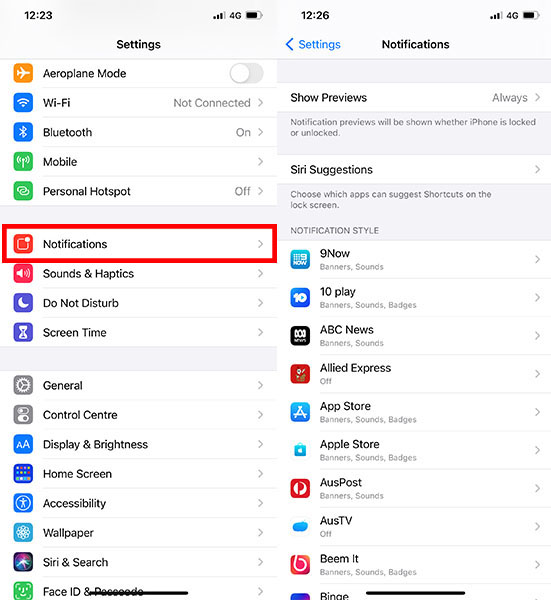
You can tweak the notification settings for each by going to your ‘Settings’ function, scrolling down to the ‘Notifications’ tab and going through each app you have on your phone to adjust your preferences.
This may take a little bit of time—especially if you have a lot of apps—but it’s well worth it.
For Android users, you'll want to swipe down from the top of your phone's screen, touch and hold the notification and tap 'Settings'. Once you're in there, tap 'Notifications off' to disable them.
Turn on ‘Do Not Disturb’.
Just like switching off the notifications from your apps, you can also switch off the notifications you get from people that you don’t wanna talk to.
Let’s be real: if you don’t want to get text message chains after work or class, take the pressure off and just pretend you didn’t receive them.
The best way to do this is to set a specific time for your phone to be in ‘Do Not Disturb’ mode, where it will block any notifications and calls.
Again, all you gotta do is head to your ‘Settings’, scroll down to the ‘Do Not Disturb’ tab and create a schedule. You can also create auto-replies or accept certain callers.
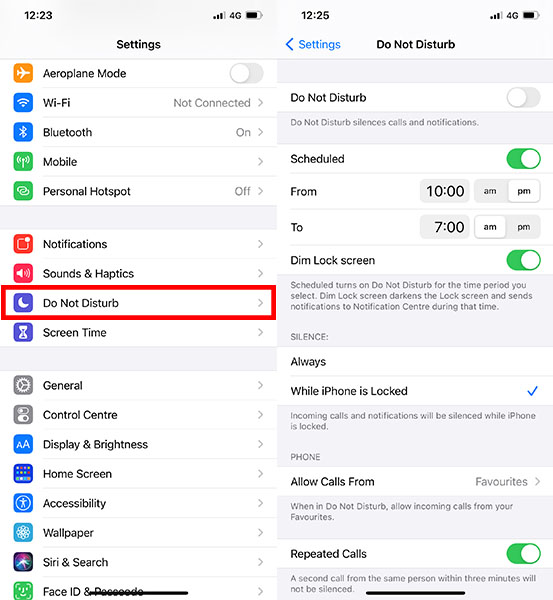
To turn on 'Do Not Disturb' on Android, all you have to do is swipe down from the top of your screen and tap 'Do Not Disturb'.
Overall, the best thing you can do to cut down your screen time is to put your phone down as much as possible and find something else to do.
Grab your ‘rents, friends, partner or siblings and play a board game, go shopping or do a fun outdoor activity instead. Your mind will defs thank you for it.
Header Image: Constantinis via Getty Images
Topics
Ref: b68e320a-aa89-45b7-b759-ad1100896b95






Comments & Feedback
Share your opinion
Emoji cheatsheet Formatting Comment guidelines