Here’s Five AI Tools Worth Checking Out for School and Uni
ChatGPT, step aside – we need to talk about some different AI tools for a minute.
There are heaps of different AI tools out there that go beyond just asking a question and getting an answer.
What if you could use AI to create your ultimate study schedule, your next presentation, or cut down heaps of info on a webpage in one click?
We put some AI tools to the test to see how good they really are, and how you might be able to utilise them.
Gamma.
If you’re looking to spice up your next slideshow presentation, check out Gamma.
It’s free to sign up, however you get 400 ‘credits’ to use the AI features.
To use the AI generator, it costs 40 credits per document, so we gave it a whirl to see how it goes creating a presentation on Taylor Swift’s career from scratch.
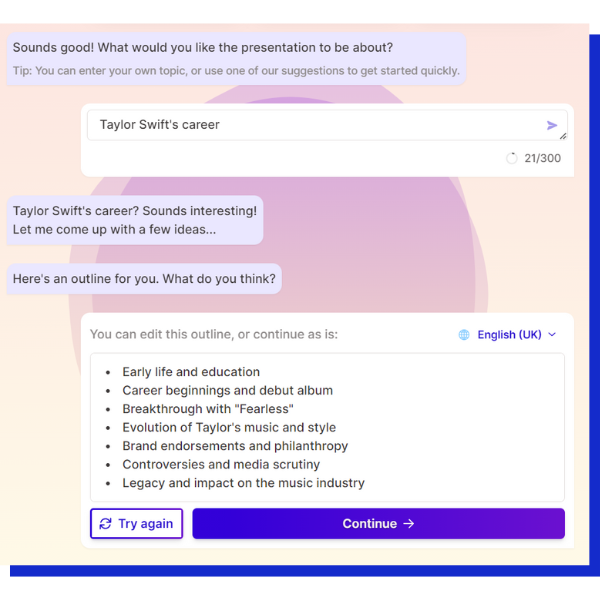
There’s a decent amount of standard themes to also choose from, of your can create your own custom theme too.
Once I selected the theme I liked, I watched as Gamma literally typed out and created the entire presentation for me, complete with timelines and pictures.
My jaw dropped.
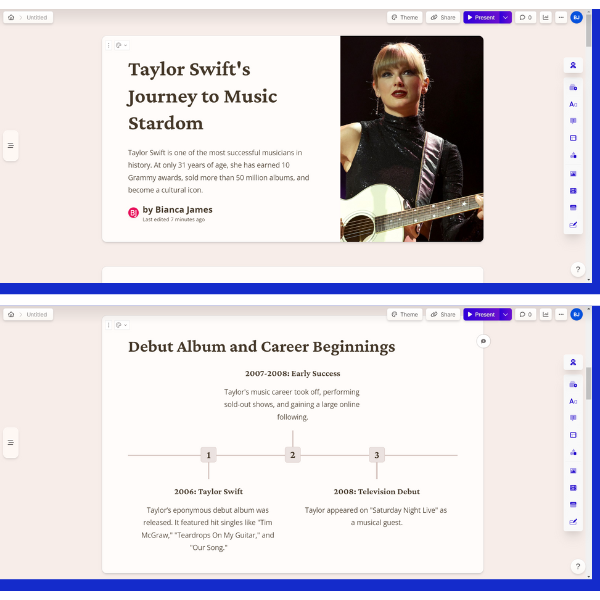 Now I’m not gonna claim I’m a die-hard Swiftie, but it’s fair to say though if I wanted to learn a bit more about her, I’ve got some great places to start just based on this presentation alone.
Something to consider when using any AI tool, is that it’s not going to truly capture your tone of voice, so it’s always going to need to use some editing.
It used the word ‘eponymous’ - I’m not going to pretend I knew what that meant.

Keep in mind this isn’t going to do any referencing for you either. The images come directly from a Bing image search too, which you can’t use to find the original source.
Would I pay to use the AI tools for roughly $30 a month? Unless you're constantly making presentations, $30 a month is a lot to fork out.
I’d suggest creating my your own presentations from scratch within Gamma itself. It has some really awesome features you can add to slides, and its look is a nice fresh change from PowerPoint.
TLDR This.
If you’ve ever been researching something and popped into a Wikipedia page, you’re immediately swamped by a whole bunch of text – it can be super overwhelming.
What if we told you there’s a website that will summarise all the info for you?
With TLDR This, you have the option of pasting the URL of the page you want summarised, or pasting specific text before it highlights key sentences.
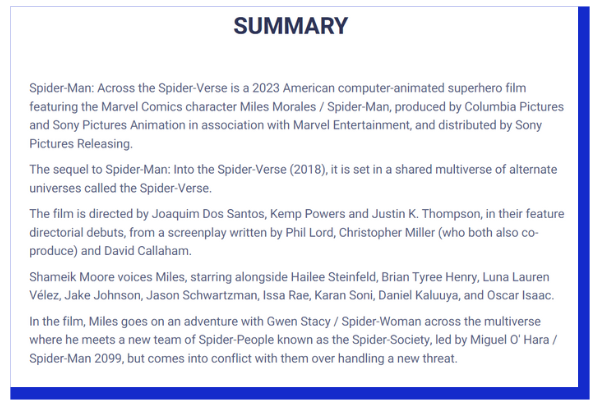
I asked TLDR This to summarise Spider-Man: Across the Spider-Verse’s Wikipedia page. It kinda worked, but not in the way I hoped.
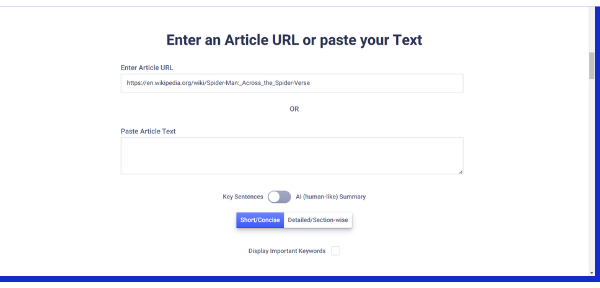
My goal was to have it summarise the basic plot and describe the film as a whole, but it pulled bits of information I wasn’t necessarily interested in.
Not only did it spoil some of the story in two sentences, but it highlighted very specific details about the making of the film, as well as mentioning a critic review and a nomination it received.
When I pasted the first paragraph instead of the entire URL, it worked much better.
 You can have it go into more detailed/sectioned summaries, but it will require you to sign up to use AI ‘human-like’ summaries before having to pay per month to use it.
Depending on what kind of info you’re after, you can use TLDR This pretty cleverly to get what you need without having to pay for it.
Taskade.
Taskade is a digital workspace that you can customise to suit any part of your life – from creating an assignment tracker, to tracking your personal goals, creating mind maps and more.
There’s heaps of templates you can use to help with organisation for a variety of different projects.
Taskade has 1000 AI credits for you to use, which refreshes each month. It’s a bit weird how your credits work, because it’s calculated based on word length and count, so the longer the words, the more credits are used.
You can use AI within Taskade to help generate ideas and prompts for whatever use you need, like ChatGPT.
I decided to test it further and ask more from it and see how many credits it used.
I tasked it to create a high school group project presentation. It gave me checkboxes for each point to cover, and broke it down really well.
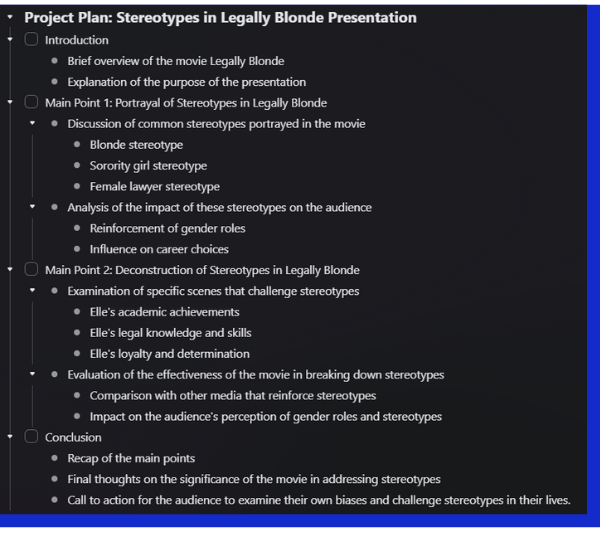 Once I created second project through AI, it wasn’t long before my credits were sitting at a small 270.
Taskade is great without needing to use the AI, but it definitely helps when wanting to create certain elements within your own personal workspace.
Otter.ai
Ever had a study session with friends, or been listening to an online lecture and wish you remembered all the good stuff?
Otter.ai can turn voice recordings into smart notes – a lifesaver.
It’s free to sign up, when you record your conversation in the program, it will transcribe it for you. It can even distinguish between different people speaking and provides a summary of key words that were spoken.
You can also highlight and comment on parts of your transcription, and search for parts of the conversation.
You’ll find, however, Otter does struggle a bit with accents so it’s not always perfect. If you’re trying to have Otter pick up something that’s pre-recorded, you’ll have a bit of trouble there too depending on the quality of the recording.
You get a limit of 300 minutes to record each month.
Their Pro subscription will set you back about $25.50 a month, but, not only do you get 1200 minutes of transcription a month, but you can import files (like a lecture) to be transcribed too.
Otter can be super helpful and takes the work out of manually transcribing.
Krisp.
Stepping away from the power of AI via text, check out ‘voice productivity AI’ with Krisp.
If you’re ever studying or working from home where it might be quite noisy – it might be because of annoying younger siblings or the family dog.
Krisp uses background voice cancellation, noise cancellation and more to have you sounding, well, crisp.
Once you install it on your computer, you can connect it to your Zoom, Teams or Google meetings. If you have a meeting that goes for at least five minutes, you’ll get a transcript for you to read afterwards.
As part of its free plan, you get an hour of noise, background voice and echo cancellation a day, unlimited transciptions, and two meeting notes a day.
Of course like all of the AI tools we’ve mentioned above – it does have a paid subscription feature too. The Pro subscription (roughly $18 AUD a month) gives you unlimited noise cancellation, meeting notes, HD noise cancellation and more.
Will you be checking out any of these AI programs soon?